
Business Process Modeling
Plan Work Steps Clearly and Manage Them Systematically

Business Process Management (BPM) allows processes to be modeled graphically. This involves defining individual steps and linking them in a sequence from the start of the process to its end. These sequences can be modeled using elements that conform to BPM notation (swimlanes and parallel, exclusive, or inclusive gateways). The individual work steps can be defined as manual, time-driven, or automated tasks.
The workflow engine continuously monitors the processes in the background and creates new tasks or removes completed ones. Tasks are displayed with the status Open (white), Completed (green), Skipped (gray), or Canceled (red). The administrator can view this status in the BPM Editor.
In the task list, the generated tasks are displayed on a user-specific basis as follows: object (e.g., item), task (e.g., maintain feature), receipt date, target date, and task description. Tasks can be edited immediately via a direct link. As soon as the task is completed, the workflow engine recognizes this and continues to control the process.
The Benefits
BPM Editor
The BPM Editor allows you to map processes in a structured manner. In the BPM Editor, you can select elements that conform to BPM notation, arrange them, connect them with arrows, and configure their parameters.
- At the start of the process, the input set is defined using conditions. These can be objects to be monitored, such as new items.
- User groups are assigned to each user task. In addition, a target date and a precise assignment of the data to be maintained are specified. Typical user tasks include maintaining images, features, references, texts, translations, statuses, or assortments.
- Typical system tasks include sending emails, setting a status, or setting specific features.
- Time events can trigger additional tasks, for example, if the deadline for a task has been exceeded by x days.
- The tasks can run sequentially (swimlane). Using the parallel gateway, multiple process steps can run in parallel and be linked to a common endpoint. Additionally, check conditions can be defined to determine corresponding branching paths.
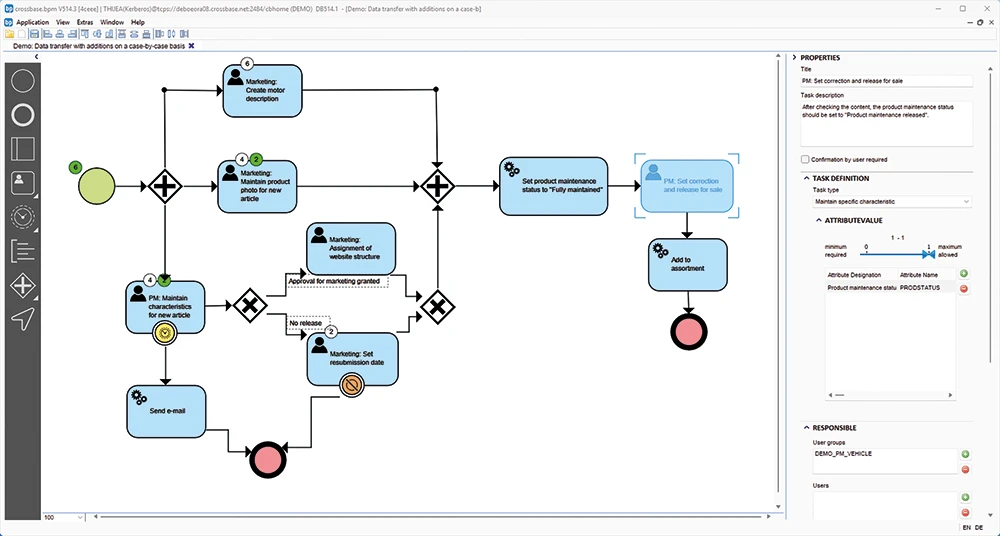
Graphical editor for business process modeling, using a process for data maintenance of a new product as an example. The numbers in the circles indicate how many tasks have been completed (green) or are still pending (white).
Example of a BPM Process
New items are transferred via the ERP system and created in the PIM:
1. The product manager receives a notification as soon as a new item is transferred from the ERP system and decides whether the item is relevant for sales. If so, a corresponding product maintenance status is assigned.
2. Graphic designers are then notified to update the images. At the same time, the marketing team updates the technical product features and descriptive texts.
3. Once these tasks are complete, the data can be reviewed and approved.
4. After release, the item is automatically added to the assortment and, for example, displayed in the shop for customers to select.
5. Once the product has been added to a country-specific assortment, the relevant translators receive a notification.